Customer transactions report logs data on the following customer balance transactions:
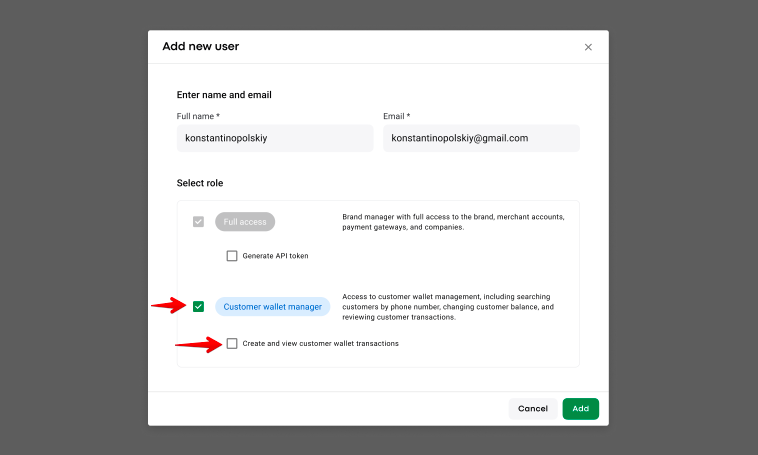
- manual top-ups and charges of customer Wallet balances performed by a Brand/Customer wallet manager with “Create and view customer wallet transactions” permission
- top-ups with Card, Apple pay, Mobile money and Top-up coupons affected by customers from the Customer app
- Credit card transaction fee charges
- Compensation on customer Wallet for unpaid cash and terminal orders
- 2 records for a successful cash/terminal/Apple pay/card payment
a. charge on the wallet
b. auto top-up by card/Apple pay/cash/terminal
- 2 record for an unsuccessful cash/terminal/Apple pay/card payment (unless the payment method is Wallet)
a. charge on the wallet
b. compensation transaction
Customer Wallet transactions report is available on the Merchant level
The following users can generate and download Customer Wallet transactions report
Brand manager
Merchant manager with Full access
Customer wallet manager with “Create and view customer wallet transactions” permission
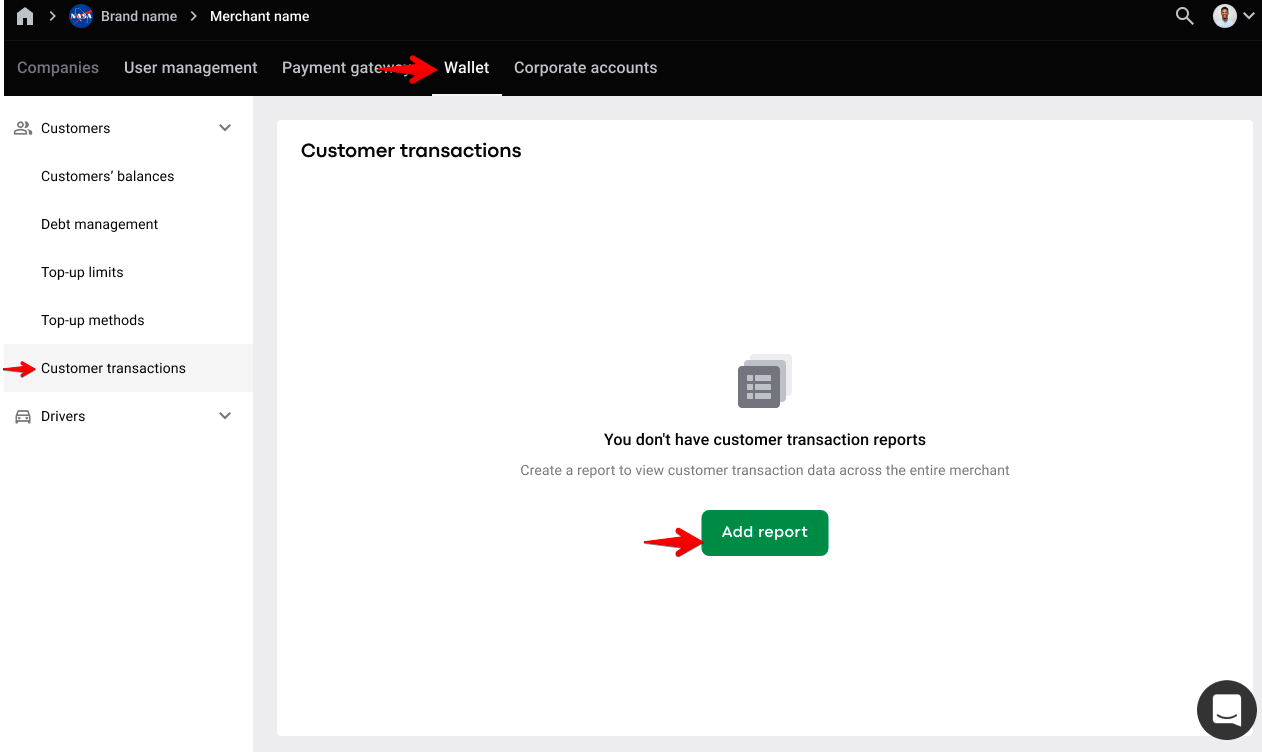
To generate customer Wallet transactions report go to the Merchant level > access tab “Wallet” > proceed to “Customer transactions” > tap on “Add report”.
Check the article How to manage reports on the Merchant level for tips to extract and
filter generated reports.
A. Date/Time
Date and time of the transaction in UTC format
B. Brand ID
Unique identification number of the brand customer belongs to
C. Merchant ID
Unique identification number of the merchant customer belongs to
D. Merchant Name
The name of the merchant
F. Company ID
Unique identification number of the company customer had order & transaction in. The Company ID is specified only if the wallet change was related to a specific order; otherwise, the column will remain empty.
G. Company Name
The name of the company. The Company Name is specified only if the wallet change was related to a specific order; otherwise, the column will remain empty.
H. Customer ID
Unique identification number of the customer
I. Customer Name
The name of the customer
J. Customer Wallet ID
Unique identification number of the customer’s wallet
K. Operation type
Credit - for addition of balance
Debit - for balance deductions
L. Payment Method
Cash/Apple Pay/Credit Card/Wallet/Coupon
M. Transaction Category
ORDER_CHARGE,
ORDER_TOP_UP_CREDIT_CARD,
ORDER_TOP_UP_CASH,
ORDER_CHARGE_COMPENSATION,
ORDER_TOP_UP_THIRD_PARTY, ORDER_TOP_UP_TERMINAL,
ORDER_TOP_UP_APPLE_PAY,
CREDIT_CARD_TRANSACTION_FEE,
ORDER_CANCEL_FEE_CHARGE,
MANUAL_CHANGE,
TOP_UP
Etc.
N. Order ID
Unique identification number of the order associated with the transaction. The Order ID is specified only if the wallet change was related to a specific order; otherwise, the column will remain empty.
O. Amount
The exact amount of money that was topped up, charged, refunded.
P. Currency
ISO currency code. It is the code of the currency of My Hub.
Q. Comment
A comment left at the manual credit and debit performed by MyHub user (for ex: adjust/refund).
R. Incoming balance
Customer balance before the transaction
S. Outgoing balance
Customer balance after the transaction
Check the articles How to manage reports on the Company level and How to manage reports on Merchant level for details on managing other types of reports.