To add a new service one should navigate to tab “services” in the Management section of My Hub and tap on “Add service” at the top right corner of the screen.
For previous steps check the posts:
Service configuration 1. General settings
Service configuration 2. Payment methods: trip calculation options
Service configuration 3. Payment methods: types
Service configuration 4. Fee settings: Meter modes and rates

Let’s see when and how a cancellation fee applies.
1. By default a customer is charged with the fee in case he cancels an instant order after its acceptance by the driver. However, a customer may be given a “grace period” for cancellation of orders in “accepted” status. The “grace period” (“0” by default”) is set in cancellation policy. If the order is cancelled within the time set in the “Free cancellation for minutes after booking" field no fee charges are applied. If the given “grace period” runs out the customer will be charged accordingly.

2. Cancellation fee also applies in cases when a "Min. driver’s wait time before they can cancel the order for free " runs out. Mind that "Min. driver’s wait time before they can cancel the order for free " countdown starts only once ETA = estimated time of arrival set by driver at order acceptance is over.
5 min is set as the default waiting time value. “Min. driver’s wait time before they can cancel the order for free ” can be decreased or increased from 1 minute up in Fee settings > Cancellation by driver of each service.
The charge does NOT apply if a customer cancels the trip when a driver is late for more than 3 minutes and distance from driver to pick up location is more than 200 meters. These values are default and can be adjusted in Cancellation policy fields as well. 1 min is the minimum allowed in “Free cancellation if the driver did not arrive in *”. 0.1 - 0.5 km range is possible for “Min distance from driver to customer”.
If “Client didn’t show up” reason is selected by driver before ETA + “Min. driver’s wait time before they can cancel the order for free ” runs out the driver will be fined with cancellation fee.
3. A customer is allowed to cancel a trip in any status until “Transferring”= on a ride, which applies once the driver “Swipes to start a ride” from A to B. Thus, logically, cancellation fee is not supposed for this scenario.
A company owner may decide whether the funds for customer cancellations are shared with the drivers or not.
If the checkbox “Do not share cancellation fee with driver” is checked the fee goes to the company's merchant.
If the checkbox “Do not share cancellation fee with driver” is left unchecked the fee goes to a driver’s balance. In this case fee value is credited to the driver's balance minus the commission as per driver’s subscription.
IMPORTANT
For an order placed on cash/terminal payment method the system doesn't allow to share the cancellation fee with the driver even if the checkbox “Do not share cancellation fee with driver” is checked

1. Customers have a default “grace period” for cancellation of orders in “accepted” status. The “grace period” is registered in “Free cancellation for preorders minutes in advance”. The default “grace period” is 30 min. Hence, by default a customer is charged with a cancellation fee in case they cancel an accepted pre-order 30 minutes before the pick-up or less.
To change the “grace period” one should add some value (maximum pre-order period 30 days in minutes) to “Free cancellation for preorders minutes in advance” line. If the order is cancelled before the “grace period” countdown starts no fee charges are applied. If the “grace period” time is over a customer will be charged accordingly. If “0” is added no fee will be put on a customer.

2. The logic is similar to that of “Customer cancellation fee (instant bookings)”.
3. The logic is similar to that of “Customer cancellation fee (instant bookings)”.
IMPORTANT!
Reason factor at order cancellation does not matter in case cancellation fee policy conditions apply.
1. If a customer of the company that works with Customer Wallet cancels an order and a cancellation fee applies, the fee is charged on:
a.default credit card if it is selected as the payment method for the trip and the funds are sufficient
b. Wallet balance for cancellations on Wallet, Cash, Terminal payment methods and if the charge on the default card selected as the payment method is failed.
No cancellation fee is charged on Customer Wallet for Corporate account payment method
1. By default the fee applies to the cases when a driver cancels the instant job after accepting it. However, a driver may be given a “grace period” for cancellation of orders in “accepted” status. The “grace period” (“0” by default”) is set in cancellation policy. If the order is cancelled by the driver within the time set in the “Free cancellation for minutes after booking" field no fee charges are applied. If the given “grace period” runs out, the driver will be charged accordingly.

2. The system will charge the driver when the customer cancels an order informing that there is “Driver didn't show up”.
“Driver didn't show up” situation means that the driver is late for more than 3 minutes after ETA = estimated time of arrival (pickup time for pre-orders) and is farther than 200 meters from pickup location. These values are set as default in Fee settings > Cancellation policy fields and can be adjusted: 1 min is minimum allowed in “Free cancellation if the driver did not arrive in". 0.1 - 0.5 km range is possible for “Mindistance from driver to customer”.
If the order is cancelled by customer before ETA + “Free cancellation if the driver did not arrive in” runs out he/she will be fined with a cancellation fee.
3. The driver will be charged with a fee for cancellations with trips in “Transferring”= on a ride status, which applies once the driver “Swipes to start a ride” from A to B
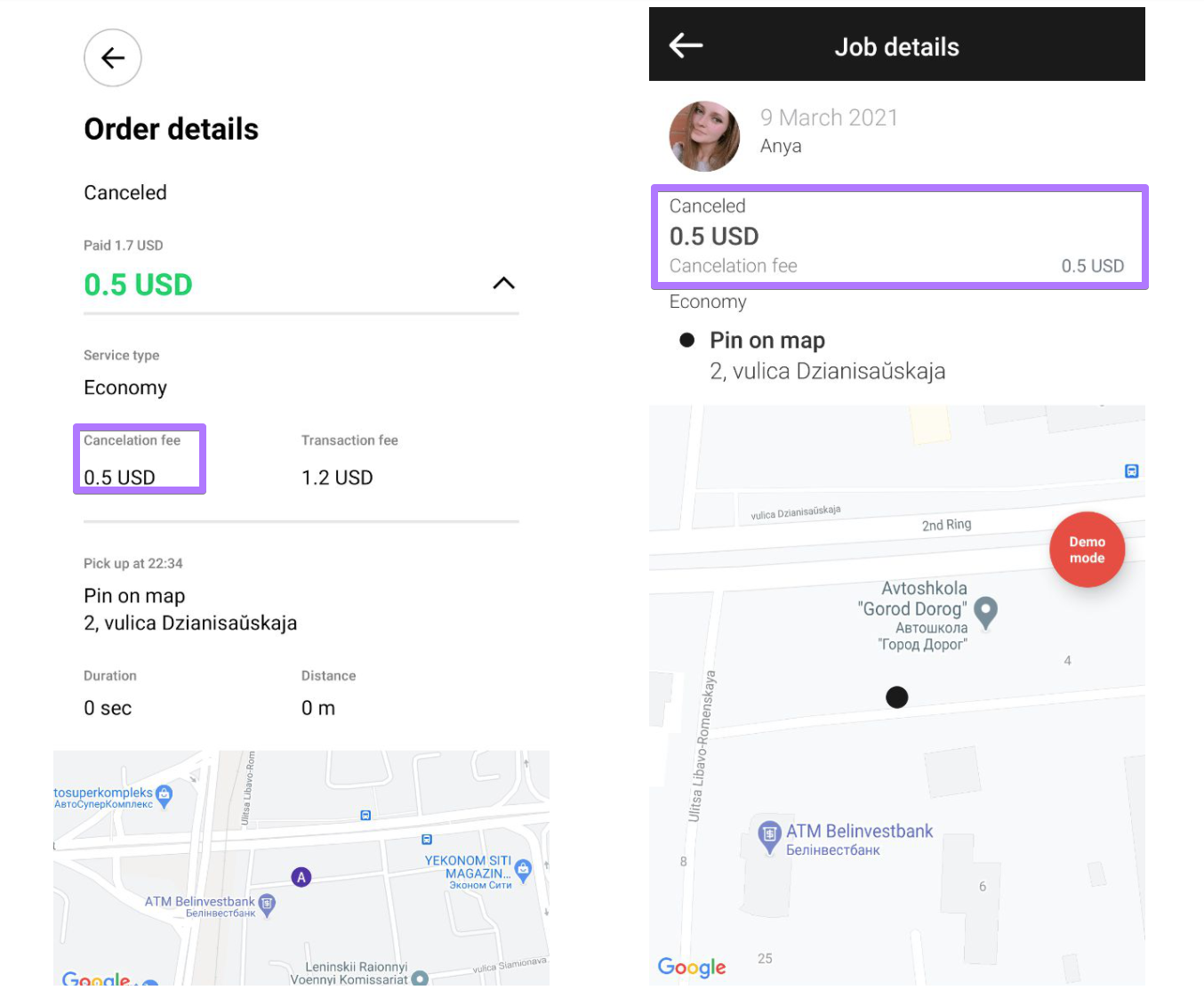
Driver cancellation fee is taken from a driver’s balance. Fee is registered as a transaction against the driver's account. System does not charge the fee from a driver’s credit card.
1. customer app (booking history)
2. driver app (Recent jobs + transactions)
3. driver profile transactions in My Hub
4. Order reports
1. Drivers have a default “grace period” for cancellation of orders in “accepted” status. The “grace period” is registered in “Free cancellation for preorders minutes in advance”. The default “grace period” is 30 min. Hence, by default a driver is charged with a cancellation fee in case they cancel an accepted pre-order 30 minutes before the pick-up or less.
To change the “grace period” one should add some value (maximum pre-order period 30 days in minutes) to “Free cancellation for preorders minutes in advance” line. If the order is cancelled before the “grace period” countdown starts no fee charges are applied. If the “grace period” time is over a driver will be charged accordingly. If “0” is added no fee will be put on a driver.

2. The logic is similar to that of “Driver cancellation fee (instant bookings)”.
3. The logic is similar to that of “Driver cancellation fee (instant bookings)”.
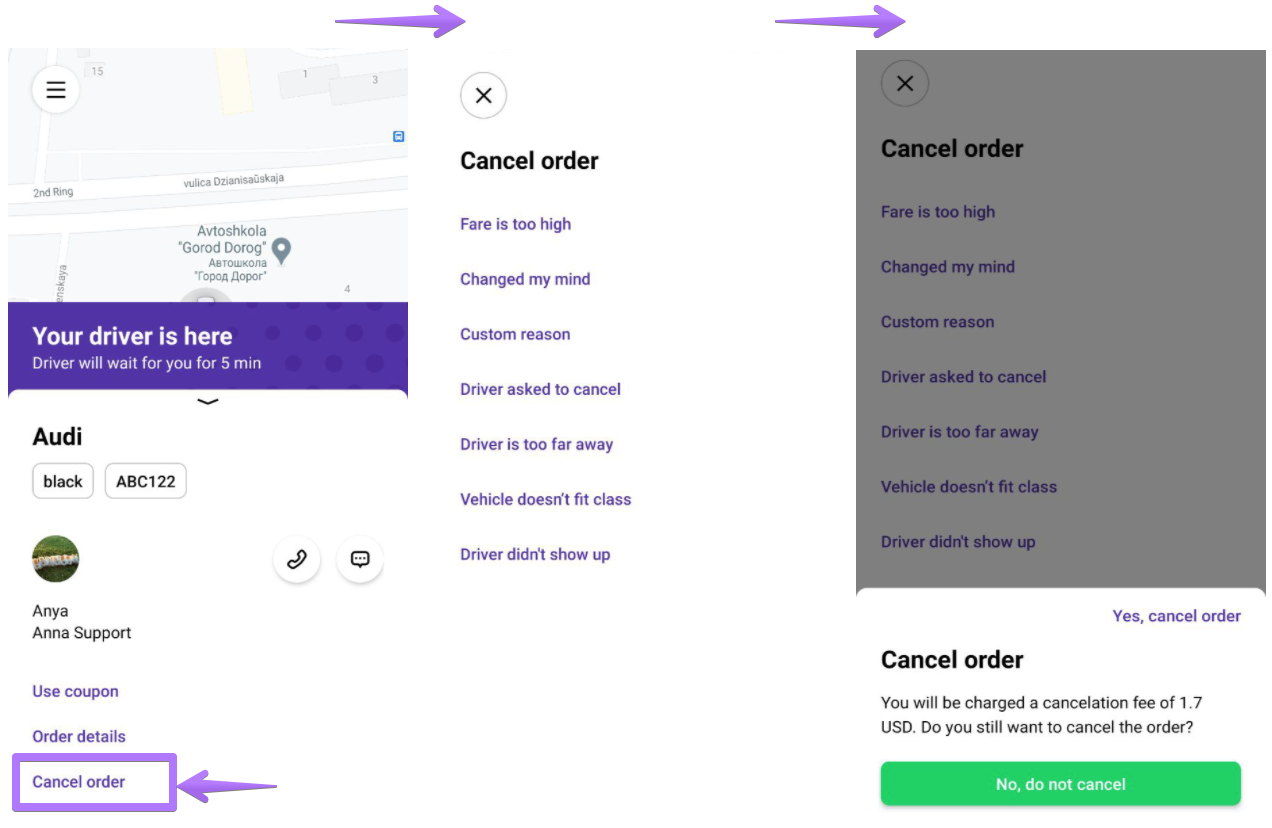
Order cancellations by mistake are brought to a minimum via a step-by step cancellation process for both drivers and customers:
either asking to just reconfirm their decision (in case Cancel was selected by mistake)
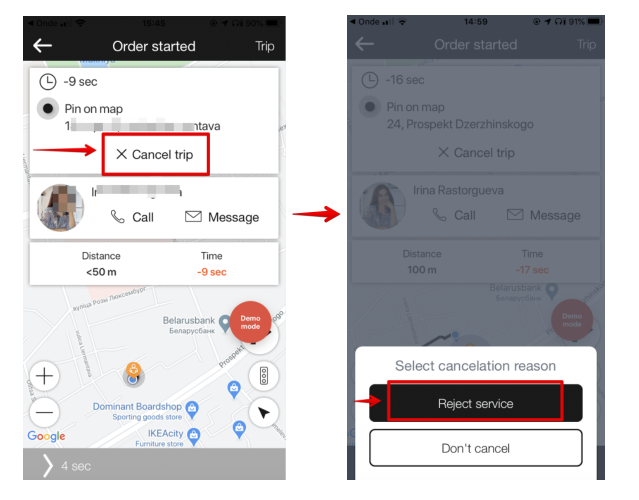
or informing on the fee that will be charged in case the conditions stated above apply
No worries on losing orders due to driver cancellations! The system sends all cancelled by driver bookings (instant and pre-orders) back to auto search attempting to find a new driver to process them. Thus, negative user experience is minimised. Moreover, the driver who cancels an order (fee or no fee) is put back in the intelligent order queue.
Consult the post “New driver search for cancelled orders” for details.
Now that we have covered the Cancellation policy set-up let’s review Service configuration 6. Night rates.
