At profile registration, each driver should fill out:
Personal profile: photo, phone number, name, email address for Trip summaries, and emergency contact number
Work profile: photo (can be set as required in Driver settings), Name (displayed for customers), and Driver license number
Vehicle details: photo (can be set as required in Driver settings), Brand and model, production year, number of passenger seats, colour, plate number, board number
Additional documents: Driver's licence (front side) and Driver's licence (back side). Both documents are Optional by default.
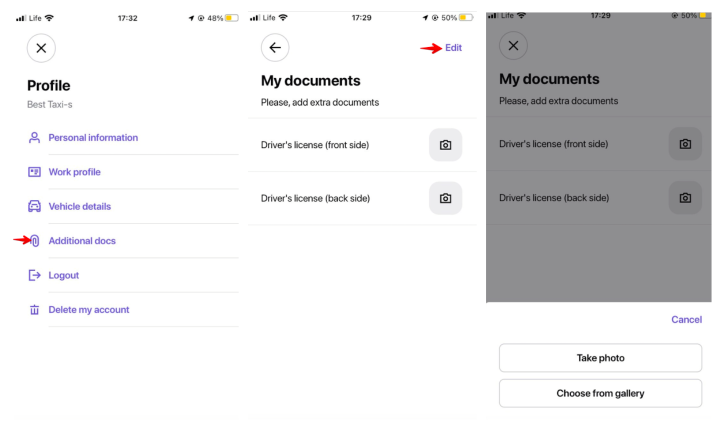
In some countries, a particular set of documents is required by local authorities for a driver to be eligible for work. If you need any additional documents in the driver app, drop us a message at [email protected].
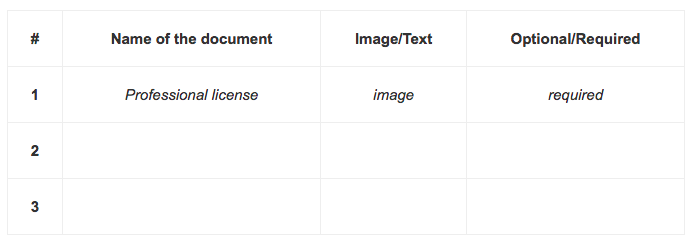
Attach the information on each document according to the format:
the exact official name of each document in the language you need + the correct translation in English (mind that the documents can only be set in 1 default language and do not depend on a driver’s device language)
what each document is for
whether it should be IMAGE or TEXT
whether it should be OPTIONAL or REQUIRED for drivers to add
If the document list is extensive, please submit the above data in the form of a TABLE in a Google spreadsheet shared with [email protected].
IMPORTANT
1. The default driver licence document can be set as Required.
2. The expiration date can be added to any required document. A document with the expiration date is validated as per the expiration date check mechanism.
3. For a TEXT document, one can define Style (e.g., capitalise all), Grouping (e.g. 4, 2, 2) and RegExp/format validation (e.g. 6 digits 0-9).
4. Default configuration does not support: dropdown lists, bullet links, checkboxes, links, etc.
5. The following formats are accepted for driver documents: “.png”, “.jpg”, “.jpeg”. The maximum allowed size for each driver document file is 5 mb. In case there is an error in adding a document, most probably the size is too big and has to be adjusted.
6. Additional driver documents are applied per company. So, if another company is linked to a brand, driver documents have to be added for the company within a separate configuration.
7. Additional driver documents are displayed in the Driver app and a driver's profile in My Hub.
8. Additional driver documents are not logged in the Drivers report.
NB: One-time configuration fee applies. Contact [email protected] for details.
